Thunderbird OPML Import/Export
Aha! I was digging around some more, and thought I’d see if there was any kind of official movement on OPML import for Thunderbird. So I wandered over to the Mozilla bug tracker, and did a search for “OPML” in the “Thunderbird” project. That turned up a single hit, which was Bug #258102. Towards the bottom, were some patches from Justin.
At first, I wasn’t sure how to apply them. His patch touches a file named “subscriptions.js”, which I couldn’t find in my Thunderbird installation. But then I realized that it was packed up in a .jar file. I unpacked the ‘newsblog.jar’ file (it’s just a .zip by another name), applied the patch, repacked the jar, dropped it back into my Thunderbird installation, and voila!
This still needs some work, it is alpha quality at best. Proceed at your own risk. Here there be dragons. Do not taunt Happy Fun Ball. The imported feeds will all be under your main feeds folder, it will not auto-create subfolders for you. The feeds will get imported, but don’t show up in the list when you “Manage Subscriptions”. On a similar note, only your manually added feeds will get exported. I’m sure that these bugs will be fixed at some point. Update: this appears to be a problem on my laptop installation of Thunderbird 1.0. It works better on my Debian Linux install of Thunderbird 0.8 at work.
If the above problems don’t bother you too much, and you just want to get a bunch of feeds imported now, here’s what to do:
- Exit Thunderbird
- Download my patched copy of newsblog.jar
- Find the original newsblog.jar file for your installation, rename it (e.g. ‘newsblog.jar.orig’), and put the new version in its place. Under a standard Windows installation, it should be under “Program Files\Mozilla Thunderbird\chrome”. Under Linux/FreeBSD, try something like “/usr/share/mozilla-thunderbird/chrome”
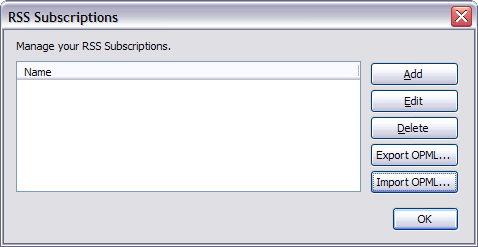
- Restart Thunderbird, and go to the “Manage Subscriptions” option of your News & Blogs folder to see your shiny new OPML buttons!
Note: I did not write the OPML import code. All I can take credit for is bringing it to your attention. All kudos belong to Justin Kirby (hey look, another WordPress blog 🙂 ), as far as I can tell.

Pingback: Max At Eleven - Blog
Pingback: Nuudelisoppa
Pingback: Blogs Of The Day » popular articles on WordPress blogs
Pingback: richard-heider.de [Scrapbook]
Pingback: Max At Eleven - Blog
Pingback: Verstehen & Gestalten - Weblog @ myblog.de
Pingback: soeren says
Pingback: Travellers Tale
Pingback: Weblog for Costin Manolache
Pingback: Rerum Varium
Pingback: Ed's Blog
Pingback: Mike’s Geek Web Blog » Blog Archive » Import / Export RSS Feed tool for Mozilla Thunderbird
Pingback: soeren says » Blog Archive » Bloglines
Pingback: sequential statements » Thunderbird 1.0 Import/Export OPML
Pingback: Citizen Keith
Pingback: Over 40
Pingback: Chow Crave :: News Aggregator / Syndication / RSS|Atom Feeds : เมื่à¸à¹€à¸à¸´à¸”à¸à¸²à¸à¸²à¸£ blog overload :: August :: 2005
Pingback: Chow Crave :: News Aggregator / Syndication / RSS|Atom Feeds : เมื่à¸à¹€à¸à¸´à¸”à¸à¸²à¸à¸²à¸£ blog overload :: August :: 2005
Pingback: b’s mixed bag :: News Aggregator / Syndication / RSS|Atom Feeds : เมื่à¸à¹€à¸à¸´à¸”à¸à¸²à¸à¸²à¸£ blog overload :: August :: 2005
Pingback: geek ramblings » Firefox and Thunderbird Betas
Pingback: Entrepreneur Geek » Blog Archive » ThunderBird and OPML
Pingback: oemebamo
Pingback: Too Many Words » Blog Archive » Thoughts On Pluck
Pingback: LOSER’s Hideout » Blog Archive » ì¬ë”버드(ThunderBird) - OPML ê°€ì ¸ì˜¤ê¸°, 내보내기 기능 추가하기