Thunderbird 1.0 OPML Import/Export

Stumble It!
Thunderbird OPML Import/Export

Thunderbird OPML Import/Export

Aha! I was digging around some more, and thought I’d see if there was any kind of official movement on OPML import for Thunderbird. So I wandered over to the Mozilla bug tracker, and did a search for “OPML” in the “Thunderbird” project. That turned up a single hit, which was Bug #258102. Towards the bottom, were some patches from Justin.

At first, I wasn’t sure how to apply them. His patch touches a file named “subscriptions.js”, which I couldn’t find in my Thunderbird installation. But then I realized that it was packed up in a .jar file. I unpacked the ‘newsblog.jar’ file (it’s just a .zip by another name), applied the patch, repacked the jar, dropped it back into my Thunderbird installation, and voila!

This still needs some work, it is alpha quality at best. Proceed at your own risk. Here there be dragons. Do not taunt Happy Fun Ball. The imported feeds will all be under your main feeds folder, it will not auto-create subfolders for you. The feeds will get imported, but don’t show up in the list when you “Manage Subscriptions”. On a similar note, only your manually added feeds will get exported. I’m sure that these bugs will be fixed at some point. Update: this appears to be a problem on my laptop installation of Thunderbird 1.0. It works better on my Debian Linux install of Thunderbird 0.8 at work.

If the above problems don’t bother you too much, and you just want to get a bunch of feeds imported now, here’s what to do:

  1. Exit Thunderbird
  2. Download my patched copy of newsblog.jar
  3. Find the original newsblog.jar file for your installation, rename it (e.g. ‘newsblog.jar.orig’), and put the new version in its place. Under a standard Windows installation, it should be under “Program Files\Mozilla Thunderbird\chrome”. Under Linux/FreeBSD, try something like “/usr/share/mozilla-thunderbird/chrome”
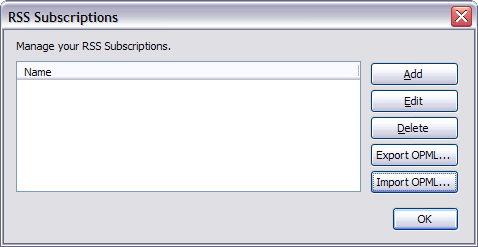
  4. Restart Thunderbird, and go to the “Manage Subscriptions” option of your News & Blogs folder to see your shiny new OPML buttons!

Note: I did not write the OPML import code. All I can take credit for is bringing it to your attention. All kudos belong to Justin Kirby (hey look, another WordPress blog :) ), as far as I can tell.

Stumble It!

47 Comments

  1. M Says:

    Works like a charm in 1.0 on windoze! Thanks, was looking for this.

  2. Reading mail list over RSS

    Probably old news - but I just found it today. Gmane - the mail-list-to-news gateway I’m using for most mailing lists - is also providing an RSS feed.For example: http://rss.gmane.org/gmane.comp.jakarta.tomcat.devel Also a ‘weblog-like’ view - check…

  3. Rerum Varium Says:

    Importar OPML en Thunderbird

    Si no fuera por Dougal Campbell, ya habría desechado Mozilla Thunderbird como cliente de correo y News. En el artículo citado hay una lista infalible de pasos para agregar soporte de importación de archivos OPML. ¡Gracias!…

  4. Heh. “Do not taunt the Happy Fun Ball.” Damn…I haven’t thought of that in years.

    Oooh! The doorbell!!! I wonder if that’s my new Bass-O-Matic?

  5. Ed's Blog Says:

    Import/Export rss feeds with Thunderbird

  6. Dan Semaya Says:

    This works on Mac OS X. The newsblog.jar file that you need to replace is inside the Thunderbird application bundle. To get to it, control-click (or right click) on the Thunderbird icon in the Applications folder, select “Show Package Contents” and navigate to Contents/MacOS/chrome . Then the two buttons will appear. Thanks for this trick. It has worked great for me.

  7. Iban Says:

    MUY UTIL !!!

    Thank you very much / Mutxas gracias / Eskerrik asko !!

  8. Rob Says:

    Beautiful! Works like a charm on Thunderbird 1.0/Windows!

    Thanks!

  9. Gordon Says:

    Worked first time on XP Pro/Thunderbird 1.0. Cheers!

  10. ShuMann Says:

    Whoa - great :)

    Haven’t tried this yet, but I’ve been looking for something like this for weeks. I hate not remembering and having the SAME newsfeeds on all my systems, and both work workstations (Linux/Windows).

    If it works as advertsed, I’ll be ONE happy puppy! Thanks!

  11. Ted Says:

    You rule. This was exactly what I needed, and it works — two things that don’t often go together.

  12. hugoyg Says:

    it work well,tkx

  13. none Says:

    Thank you, this worked. It drove me nuts not having the same newsfeeds on all my systems.

  14. sninky-chan Says:

    Thanks, this JFW’d! Saved my life. Well done!!

  15. [...] as getting tired of keeping my aggregators at the house and at work in synch until I found this. This just made my life alot easier. This entry was po [...]

  16. の読み込み、書き出しができないこと。これじゃ使えないと思っていたところ、OPML が扱えるように機能拡張したファイルを配布しているところを発見。 geek ramblings » Thunderbird 1.0 OPML Import/Export NetNewsWire Lite から OPML

  17. soeren says Says:

    It also provides tighter integration, for example, using a Firefox plug-in, you can click and link or go to any page and try and subscribe to it from the contextual menu. That’s all fine and dandy. After I figured out how to patch my Thunderbird to allow for OPML export , I had most of my feeds set up, except that it ignored the hierarchy (I’m not sure whether Thunderbird’s export was hierarchical in the first place, however, so this may not be Bloglines’s fault at all). Here

  18. [...] menu. That’s all fine and dandy. After I figured out how to patch my Thunderbird to allow for OPML export, I had most of my feeds set up, except that it ignored the hiera [...]

  19. eine praktische Angelegenheit, es ist ein XML-”Dialekt”, der alle (Bloglines-)Feeds sammelt und in eine Datei packt. Zunächst war ich etwas enttäuscht: Soll ich nun die ganzen Feeds von Hand eintragen? Nach kurzer Suche stiess ich zum Glück auf diese Anleitung : man muss eine Datei namens “Newsblog.jar” bei Thunderbird aufspüren ( im Ordner “chrome”) und mit der vom o.g. Blog überschreiben. Beim Mac (OSX) hab ich erstmal ne Weile gesucht, bis ich die newsblog.jar Datei gefunden habe:

  20. [...] herf=”http://mozilla.org/products/thunderbird/”>Thunderbird’s lack of ability to import/export OPML. It’s a quick install and works flawlessly.

    [...]

  21. My definitive solution to the RSS/Atom feeds problem Finally, I solved my problems with reading the RSS/Atom feeds. Better, I hope so. The ingredients of this temporary success are: An USB pen drivePortable MozUp Thunderbird MozUp Launcher Thunderbird 1.0 OPML Import/Export Before, I’ve been searching for a solution to get readable and portable feeds. What I needed was an RSS/Atom aggregator for Windows freeware, without .NET platform necessity, stable and portable. Until now, I tried some aggregators, always

  22. [...] city’s 60s and 70s R&B scene. Straw - I finally settled on a Linux aggregator. Thunderbird OPML Import/Export - I didn’t realize that Thunderbi [...]

  23. WhisKiTo Says:

    Really good Extension

    Why doesn’t it appear in Official Thunderbird Extensions?

    thanks man ;)

  24. Hi!
    It’s works well on my MAC OS X (10.3.9) and using Thunderbird.
    Just two negative points.
    Does not support OPML using levels (subfolders) and doesn’t support ATOM feeds.

  25. Siim Says:

    Hi,

    Thanks for saving couple of hours my time :)

  26. Over 40 Says:

    RSSリーダーソフトに再挑戦してみる

    そういえばHeadline-Readerに送金していたのを思い出した。 1年くら…

  27. Thunderbird 1.0 OPML Import/Export Convert Thunderbird Subscriptions to OPML

  28. Franto.com Flash blog » Hapland2 solution. Flash CLAMP Campus Adventures » Is Apple OSX Tiger Inherently Insecure? Tech macewan » Ubuntu Hoary with F-Spot, Evince & more Ubuntu Linux geek ramblings » Thunderbird 1.0 OPML Import/Export Blogs, Web, Tech Een frisse kijk op.. » MSN Virtual Earth Overig

  29. Nuudelisoppa Says:

    geek ramblings Ed’s blog Tried it with Thunderbird 1.0.2 (20050317) and it works.

  30. Finally, I solved my problems with reading the RSS/Atom feeds. Better, I hope so. The ingredients of this temporary success are: An USB pen drive Portable MozUp Thunderbird MozUp Launcher Thunderbird 1.0 OPML Import/Export Before, I’ve been searching for a solution to get readable and portable feeds. What I needed was an RSS/Atom aggregator for Windows freeware, without .NET platform necessity, stable and portable.

  31. This is great. Do you know of an extension that will import email and folders from Entourage? I’ve made the transition on my work/PC and I’m trying to finish moving my home/Mac account to Thunderbird.

  32. Tony Harper Says:

    Excellent! Thanks for the info.

  33. Leander de Graaf Says:

    I succesfully exported my RSS feeds from MacOS X 10.4 to Windows XP and vice versa using Mozilla Thunderbird 1.0.6, except for my folder structure, but that is not a big problem for me i’m glad you have made this patch available to the public.
    Maybe it will be nice to make an official extension for this functionality or even suggest it for the official client?

  34. Jalansutera Says:

    thanks for the step-by-step howto. it works on my thunderbird

  35. [...] มาถึงตรงนี้บางคนอาจจะสังเกตเห็นว่า เอ๊ะ ทำไมหน้าต่างนี้ของบุกถึงมีปุ่มขึ้นมาพิเศษสองอันที่ (ปุ่ม Import / Export OPML…) ไม่เห็นจะมีในหน้าต่างของเพื่อนๆเลยล่ะ อันนี้ก็เพราะว่าบุกลง patch พิเศษที่ทำให้มีปุ่มพิเศษสองปุ่มนี้เพิ่มขึ้นมาน่ะค่ะ ข้อดีของการลง patch นี้ก็คือทำให้เราสามารถ save (export) รายการเว็บที่เราสมัครไว้ไปใช้กับโปรแกรมอ่านข่าวตัวอื่นๆ (โดยการ import) ได้ ไม่ต้องมานั่ง add ทีละรายการอย่างที่เรากำลังจะทำต่อไปนี้อีกหลายๆรอบน่ะค่ะ ถ้าเพื่อนๆสนใจจะลง ก็ทำตามวิธีทำในเว็บที่บุกได้ลิ้งค์แล้วกันนะคะ บุกขอไม่เขียนถึง [...]

  36. [...] มาถึงตรงนี้บางคนอาจจะสังเกตเห็นว่า เอ๊ะ ทำไมหน้าต่างนี้ของบุกถึงมีปุ่มขึ้นมาพิเศษสองอันที่ (ปุ่ม Import / Export OPML…) ไม่เห็นจะมีในหน้าต่างของเพื่อนๆเลยล่ะ อันนี้ก็เพราะว่าบุกลง patch พิเศษที่ทำให้มีปุ่มพิเศษสองปุ่มนี้เพิ่มขึ้นมาน่ะค่ะ ข้อดีของการลง patch นี้ก็คือทำให้เราสามารถ save (export) รายการเว็บที่เราสมัครไว้ไปใช้กับโปรแกรมอ่านข่าวตัวอื่นๆ (โดยการ import) ได้ ไม่ต้องมานั่ง add ทีละรายการอย่างที่เรากำลังจะทำต่อไปนี้อีกหลายๆรอบน่ะค่ะ ถ้าเพื่อนๆสนใจจะลง ก็ทำตามวิธีทำในเว็บที่บุกได้ลิ้งค์แล้วกันนะคะ บุกขอไม่เขียนถึง [...]

  37. Vishal Says:

    Thanks a lot, the step-by-step instructions work perfectly.

  38. [...] The new version of Thunderbird has added improvements to the RSS handling, so that hacks aren’t needed anymore. You can import and export feed lists in OPML format, and you can even have sub-folders now — sortof. You can add multiple feeds under a single folder. But the feeds won’t be individually selectable — the items all just intermingle together under the folder. There’s also no auto-detection of feeds, or drag-and-drop, both of which would be really good additions. [...]

  39. TarGz Says:

    Very cool,
    that’s work’s fine on my “portable thunderbird” who run from my usb key.

    Thanks

  40. Mick Says:

    Cheers. I searched all over for how to do this. Thanks.

  41. [...] I read about newsblog.jar on Dougal Campbell’s blog. Many people wrote about it, including Wayne Graham and Gumuz. Dougal has basically added some functions to a JavaScript file in the newsblog.jar file that provide OPML import / export. I thought of giving it a try. [...]

  42. oemebamo Says:

    [...] Google Reader? Aha. Opml Import? Mja. Thunderbird Opml Export? Hmm, naaah. Of toch? Aha. Fijn! google rss thunderbird google» rss» thunderbird» [...]

  43. [...] And if anyone is using Thunderbird and is hesitating to switch because of the hassle of re-entering all the feed URIs, download this nice little extension from Dougal Campbell’s Geek Ramblings to add OPML support to Thunderbird. Dougal is one of the developers of WordPress, another worthy project if you’re not already running it (eyes towards all you Blogger people). Technorati Tags: about.com, amphetadesk, dcist, dougal campbell, firefox, metroblogging dc, newsgator, opml, pluck, rss, searchfox, thunderbird, washington post, wordpress [...]

  44. A Says:

    Cannot find the newsblog.jar. What is the new link ?

  45. Dougal Says:

    A: This is no longer needed. OPML support has been in Thunderbird officially for quite a while now. When I moved hosts, I didn’t bother moving some old files, like the newsblog.jar.