
Awesome spam filtering for WordPress

I’ve always felt that Akismet does a pretty good job of filtering out spam. After all, since I started using it, Akismet has caught around 500,000 spam comments for me. But a few months ago, I decided to try out a different anti-spam plugin that caught my eye. And surprisingly enough, it’s my Akismet stats that tell me that the other plugin is doing a great job.

What is this mystery plugin? It’s called http:BL (for HTTP BlackList). This plugin taps into the Project Honeypot databases to block access from known sources of spam, email harvesters, and the like. To use the plugin, you must register for an API key on the Project Honeypot site. Registration is free.

The plugin filters IP addresses which are registered in the Project Honeypot databases for suspicious activity, spamming, or harvesting. I’m aware of the problems of filtering based on IP, however, the plugin smartly provides an option to check how recently the IP was active, and only block accesses which have shown recent suspicious activity. Each IP address is also rated on a scale of 0 – 255, and you can choose where you want to set the “threat level” threshold.
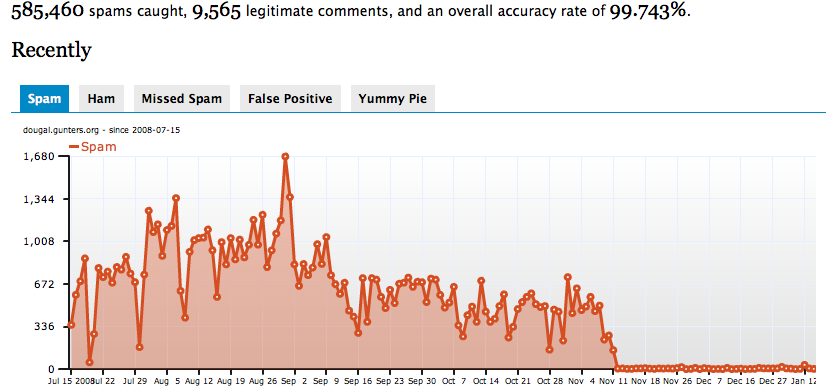
Akismet stats

In the graph here, notice how in early November, 2008, the number of spams that Akismet saw each day dropped to nearly nothing. Guess when I installed http:BL? The new plugin is seeing the spams before Akismet. But anything it allows to pass through still gets sent along for Akismet to check, too. Really, the main problem I still have right now are comments which appear relevant, but which link to sites that I consider spammy. But outright spam content in the comments themselves is just about never an issue anymore.

The main drawback I see is that I don’t have any easy way to gauge if it’s blocking false-positives. You can, however, login to your account on the Project Honeypot site, and lookup IP numbers to see what kind of activity it generated. Spot checking IP numbers from the plugin’s logs from time to time might prove to be interesting.

If you are having problems with spam comments on your blog, and you want to add an effective anti-spam plugin, I suggest you give http:BL a try. Let me know how it works out for you!

Stumble It!
Awesome spam filtering for WordPress

Related posts:

  1. Some blog spam cases you might want to watch for
    " I like to think that I’ve got some pretty decent spam prevention measure in place on my server. My mail server uses RBL/DNSBL services..."
  2. Yahoo! Web Hosting adds WordPress
    " Double Yow! Another announcement from Matt: Yahoo! Web Hosting has added WordPress to their offerings. And as an added bonus, they automatically enable the..."
  3. Spam: Kill it at the root
    " I posted an article over on the WordPress development blog earlier on the subject of blog comment spam. Why do spammers post comments on..."
  4. Testing a new spam blocker
    " I’ve been trying to snatch a few minutes here and there to work on the automated spam blocking system that I proposed last week...."
  5. Dear Spammers…
    " Thank you for continuing to submit your data to my anti-spam systems. I have been able to put your information to very good use,..."
This entry was posted in WordPress and tagged , , , , , , , , , , , . Bookmark the permalink. Post a comment or leave a trackback: Trackback URL.

19 Comments

  1. geek geekadviser.com
    Posted January 14, 2009 at 1:48 pm | Permalink

    I dont know what happens with all these things

  2. David davidlevitt.com
    Posted January 14, 2009 at 2:03 pm | Permalink

    I really find your blog interesting. I don’t so much have a use for new spam filtering though. Asismet does the job for my little old blog.

  3. demetris op111.net
    Posted January 14, 2009 at 7:12 pm | Permalink

    I use the http:BL lists through Bad Behaviour,[1] which is an even more drastic solution. :-) (Bad Behaviour incorporated this recently, in v. 2.0.21.)

    I’ve been using this combination for a few weeks and I’m happy with it. I don’t think I’ll go back to just Akismet or similar solutions like TypePad AntiSpam. I agree that the main drawback in this kind of defence is that it’s not easy to know what’s going on with false positives, and I’m not very comfortable with this, but, on the other hand, the alternative I was considering was to stop checking the Akismet queue for false positives, so, why let them in in the first place?

    Project Honeypot seems to be good!

    Cheers!

    [1] http://wordpress.org/extend/plugins/bad-behavior/

    • Posted January 20, 2009 at 3:08 pm | Permalink

      I too use BB with http:BL, but I also use Akismet. All told, maybe 2 posts get picked up by Akismet per month. Enough that the three pronged defense sticks around for me!

  4. Geof F. Morris gfmorris.net
    Posted January 15, 2009 at 8:09 pm | Permalink

    Totally gonna use this now that Spam Karma 2 is no longer in active development. [Yes, I have thought idly about taking SK2 on, as Dr. Dave GPL'd it, but not that seriously.]

  5. BigMick domains.aussiewebsites.com.au
    Posted January 15, 2009 at 8:19 pm | Permalink

    I thought Akismet did a great job of filtering out spam.

    Http:BL blows it out of the water.

    Having them both work in tandem is a good idea just to make sure nothing gets through.

  6. DazzlinDonna dazzlindonna.com
    Posted January 15, 2009 at 11:06 pm | Permalink

    I used it for a bit until something went awry. I can’t remember now what exactly the problem was, but it caused an issue for a friend of mine – his blog got caught in some kind of false positive because of my use of the plugin and had some issues – wish I could remember the details but it’s all hazy now. Anyway, I stopped using it because of the issue. So…although I’m not being very helpful with my lousy memory, just wanted to alert you to possible issues with it.

    Also just wanted to say hi, Dougal, as SU landed me here. :)

    • Dougal dougal.gunters.org
      Posted January 16, 2009 at 10:43 am | Permalink

      Thanks for stopping by, Donna! A lot of the more recent changes to my blog, like the StumbleUpon links, were made because of your advice at WordCamp Birmingham :)

      Actually, I’m gearing up to (finally) do a major redesign here, as I have some time between projects at the moment. I just need to make up my mind on exactly what I want to do :)

  7. Blogueiro fazerblogs.com
    Posted January 18, 2009 at 5:27 pm | Permalink

    Hi everybody,

    Good post.
    Did I compreend it right, could we use bouth? Akismet and Http:BL? Cos if we could its good news …
    Dam SPAMMERs!!

  8. Rich tmrw.co.uk
    Posted January 20, 2009 at 5:16 pm | Permalink

    I found http:BL a while ago too and agree, it’s a great and effective spam killer. Can I ask what ‘Threat score threshold’ you’ve got yours set on? Mine’s on 30 at the moment, but a little spam still slips though. I’ve been wary of putting the threshold lower than that in fear of blocking genuine visitors.

    • Dougal dougal.gunters.org
      Posted January 23, 2009 at 11:49 am | Permalink

      I had the threat level at the default 30 for a while. But I recently upped it to 60, with no apparent ill-effects. I also don’t block on merely ‘Suspicious’ IPs, just the comment spammers and email harvesters.

  9. Blogueiro fazerblogs.com
    Posted January 21, 2009 at 7:36 am | Permalink

    I see everyone talking about akismet, and i believe its a good spam filter.

    I have an bluehost account, and generated a password + user name true Fantastico on WP install.

    But when i want to generate a API key to akismet, true the link on the admin panel, WP said that “my password is not correct??” I`m sure that the password i`ve typed its ok, but it keeps saying thats not ok.

    Can some one help me out? I´m tired of deleting tens of spams every day …

    thanks

  10. Posted January 21, 2009 at 12:49 pm | Permalink

    I am using the http:BL plugin for some time now. I am quite content with it. My thread score threshold is set to one (the lowest value) and the age threshold to 30 days. When I was traveling in India I discovered that a lot of internet cafes are listed as suspicious. So I unchecked suspicious as malicious without problems so far.

  11. Posted January 22, 2009 at 11:37 am | Permalink

    Seems you can use them both at the same time?
    My main problem are the false positives. At least, with Akismet, when you de-spam them, they have a chance of getting whitelisted (although more often than not you should keep doing it for the same commenters).
    Did I understand correctly that this plugin has no option at all to whitelist false positives?
    Thanks for any advice.

  12. Indian indiavoice.info
    Posted January 29, 2009 at 8:49 pm | Permalink

    Project Honeypot is doing great service to webmasters. I am using same server but on different platform (joomla) using different plugin (sh404sef). But it is as effective as it is in Wordpress. I’ve used this service on a wordpress blog also and it really is great to have such a handy service. Just like reCaptcha all we need to do is to tweak a bit of the code and we are done. Three cheers to project honeypot.

  13. Steven integratedroi.com
    Posted January 30, 2009 at 2:50 am | Permalink

    It’s nice to have another layer of spam filtering. I run my email through something similar, the first layer bounces the most egregious and the next just moves it out of the way. One day they accidentally changed the algorithm of the first layer at the server and it literally bounced all of my email that day. This was a few years ago. Maybe I’ll change the settings myself if I ever want to pick up and move to another country with clean email :-)

  14. Mike R blogcatalog.com
    Posted January 30, 2009 at 9:29 pm | Permalink

    Thanks for the heads up on the new spam plugin. Sounds incredibly powerful, I’m not extremely technical, but it seems like you really couldn’t get much better protection than that, no?

  15. Daniel myshigoto.com
    Posted February 6, 2009 at 2:09 am | Permalink

    This sounds good but I’m always wary of relying on blacklists, especially when you’re not able to monitor or override false positives.
    Personally I’d stick with Akismet and avoid the risk of turning away legitimate contributors although it obviously depends on your personal circumstances and size of spam problem.
    Still, it’s great that there’s more choice in the fight against spam. I look forward to seeing how this develops…

  16. Posted August 16, 2009 at 9:21 am | Permalink

    I know this is an old post, hope it’s no problem that I stir it up a bit.

    I noticed how everyone always talk about Akismet, and what other plugins they get to work with Akismet. Clearly that’s because Akismet is the most established spam filter there is out there. I however don’t understand why people go through the trouble of doing so, there are alternatives.

    SpamTask is one filter that I’ve been using for a couple of months, and I’ve had great results so far. Though the problem you address, in which people post “spammy” links to your site wont be solved until more complete filters are created. I mean unless you could personalize your filter, it would be hard to accomplish.

    http://codex.wordpress.org/Plugins/spamtask/

    Regards, Bryan

One Trackback

  1. By GFMorris.com » links for 2009-01-15 on January 15, 2009 at 9:30 pm

    [...] Awesome spam filtering for WordPress – geek ramblings (tags: gfmorris_comment) [...]

Post a Comment

Your email is never published nor shared.

You may use these HTML tags and attributes: <a href="" title=""> <abbr title=""> <acronym title=""> <b> <blockquote cite=""> <cite> <code> <del datetime=""> <em> <i> <q cite=""> <strike> <strong>

Subscribe without commenting

  • Subscribe

  • Follow Me

    Twitter  Facebook  Flickr  Last.fm  LinkedIn  StumbleUpon  Technorati  Delicious  
  • Referrals

    Sign up for Text Link Ads and earn money from your blog.
  • Lifestream