-
Archives
- September 2020
- June 2020
- March 2020
- February 2020
- January 2020
- November 2019
- October 2019
- September 2019
- August 2019
- June 2019
- May 2019
- April 2019
- March 2019
- May 2018
- November 2017
- October 2017
- September 2017
- August 2017
- June 2017
- May 2017
- March 2017
- February 2017
- October 2016
- September 2016
- July 2016
- June 2016
- May 2016
- April 2016
- March 2016
- February 2016
- January 2016
- December 2015
- November 2015
- October 2015
- September 2015
- August 2015
- July 2015
- June 2015
- May 2015
- April 2015
- March 2015
- February 2015
- January 2015
- December 2014
- November 2014
- October 2014
- September 2014
- August 2014
- July 2014
- June 2014
- May 2014
- April 2014
- March 2014
- February 2014
- January 2014
- December 2013
- November 2013
- October 2013
- September 2013
- August 2013
- July 2013
- June 2013
- May 2013
- April 2013
- March 2013
- February 2013
- January 2013
- December 2012
- November 2012
- October 2012
- September 2012
- August 2012
- July 2012
- June 2012
- May 2012
- April 2012
- March 2012
- February 2012
- January 2012
- December 2011
- November 2011
- October 2011
- September 2011
- August 2011
- July 2011
- June 2011
- May 2011
- April 2011
- March 2011
- January 2011
- December 2010
- November 2010
- October 2010
- September 2010
- August 2010
- July 2010
- June 2010
- May 2010
- April 2010
- March 2010
- February 2010
- January 2010
- December 2009
- November 2009
- October 2009
- September 2009
- August 2009
- July 2009
- June 2009
- April 2009
- March 2009
- February 2009
- January 2009
- December 2008
- November 2008
- October 2008
- September 2008
- August 2008
- July 2008
- June 2008
- May 2008
- April 2008
- March 2008
- January 2008
- December 2007
- November 2007
- October 2007
- September 2007
- August 2007
- July 2007
- June 2007
- May 2007
- April 2007
- March 2007
- February 2007
- January 2007
- December 2006
- November 2006
- October 2006
- September 2006
- July 2006
- June 2006
- May 2006
- April 2006
- March 2006
- February 2006
- January 2006
- December 2005
- November 2005
- October 2005
- September 2005
- August 2005
- July 2005
- June 2005
- May 2005
- April 2005
- March 2005
- February 2005
- January 2005
- December 2004
- November 2004
- October 2004
- September 2004
- August 2004
- July 2004
- June 2004
- May 2004
- April 2004
- March 2004
- February 2004
- January 2004
- December 2003
- November 2003
- October 2003
- September 2003
- August 2003
- July 2003
- June 2003
- May 2003
- April 2003
- March 2003
- February 2003
- January 2003
- December 2002
- November 2002
- October 2002
- September 2002
- August 2002
- July 2002
- June 2002
- May 2002
- April 2002
- March 2002
- February 2002
- January 2002
- December 2001
- November 2001
- October 2001
- September 2001
-
Meta
Plugin conflict
Tracked down and reported a conflict with the WPTouch plugin that affected Formattd’s mobile post format setting feature.
New Theme (in progress)
If you’ve visited this site before, you might notice that I’m running a new theme, which I’ve named Formattd. And if you follow me on Twitter, you might have seen me hint about it in tweets and screen shots. Now, you’re looking at it. Well, technically, you’re looking at a child theme (named dougalizr) with extra bits specific to my site, but still. This is my first attempt to create a theme completely from scratch.
In the past, I’ve generally started with an existing theme, then just created a child theme to do subtle alterations specific to my site. But I got tired of wrestling with doing things the way that somebody else envisioned it, or having to work around extra layers of “framework” functionality in order to change something simple. I wanted my own theme that I would know inside and out. And let me tell you, I now have a new respect for theme authors. Building a theme is a lot of work, because there are a zillion little pieces and details to account for. If you are a developer, and you’ve never built a WordPress theme from scratch before, I highly recommend it as an exercise.
Let me start by saying that this new theme is not revolutionary. It’s not a “theme framework”. I haven’t put in any customizable options (yet, I might in the future). It’s not a “portfolio”, “news”, or “magazine” theme. It’s just a plain blogging theme. And at the time of this writing, it’s still not even complete (see the To Do section, below). But it has some features that I think are interesting and useful, and I finally got it far enough along that it was at the dogfood stage. So I’m launching it here to help expose the warts that still remain, and force me to deal with them.
Features
- All 10 post formats accounted for.
- You can have different format templates for archives views.
- When using the ‘link’ post format, the first link in the post becomes the ‘post link’. This will be used as the link for the post title, instead of the regular post permalink.
- Allows setting post format when posting via XML-RPC (such as from the WordPress apps for iPhone or BlackBerry). Just start your post with ‘:aside:’, ‘:link:’, etc. Example: :aside: It’s always fun until somebody loses an eye. But then it’s more fun, because you get to play with the eyeball.
- If a mobile post starts out with just an image before any text (as when you post an image from WordPress for iOS), it will automatically set the post format to ‘image’.
- Any mobile post that contains a gallery shortcode automatically gets the ‘gallery’ post format.
- ‘Chat’ formatted posts can automatically bold speakers’ names, if you use a pattern like this (name, colon, text):
Costello: Who’s on first? Abbott: That’s right. Costello: What? Abbott: Second base.
- Featured image support. Currently the HTML for this is hardcoded, but I plan to allow this to be overridden.
- Custom excerpt support. If a post has a custom excerpt, it will be displayed on the front page instead of the full post.
- The basic layout holds together all the way down into older versions of Internet Explorer.
- Basic iPhone layout adaptability (still needs some adjustments).
I’m pretty excited about the post format support for mobile blogging. I got tired of waiting for the WordPress for iOS app to support post formats, so I just made a way to go ahead and do it now. I think that being able to easily post images, statuses, and asides from my iPhone will encourage me to post more to my blog, whereas before I might have put much of that on Twitter. I still love Twitter, but I also love owning, controlling, and centralizing my content.
To Do
There is still a lot left to do: The orange that you currently see is temporary. I want to add some nice typography. The sidebar and footer are still ugly as sin and need styling. I need to put the hAtom microformat classes in. It still needs mobile-specific styles. There are still areas that need better HTML5 semantics. I still need to create several standard templates, such as search, page, and 404.
Credit Where Credit Is Due
When I say I built this theme “from scratch”, that doesn’t mean that every byte of HTML, CSS, PHP, and JavaScript sprung forth fully formed from my mind to my keyboard, as Athena from the forehead of Zeus. Far from it — I stand on the shoulders of giants, borrowing liberally from the work of others. Some of what you see here was inspired by:
- HTML5 Boilerplate and Initializr
- Matthew James Taylor’s Perfect ‘Right-Menu’ 2-Column Liquid Layout
- The TwentyTen theme
- Nicolas Gallagher’s CSS Drop Shadow demo
- Chris Coyer’s Simple jQuery Dropdown menus
- Design Festival’s Typography of Quotations & Citations
- …and probably many others that I can’t think of right now…
I want to spend a few days working out some of the kinks here, but then I plan to make the source available. I’ve put it up on GitHub (Formattd on GitHub) for now, to give anyone interested a chance to offer feedback and patches. Once it’s cleaned up enough, I’ll submit it for inclusion in the official WordPress.org theme repository.
With that said — feedback welcome!
Posted in WordPress
Tagged boilerplate, dougalizr, formattd, html5, initiailzr, iPhone, Mobile, moblog, post formats, Themes, twitter, WordPress
Leave a comment
Competitors “Taking Aim”
Open source CMS projects like WordPress, Drupal, and Joomla! provide web publishing tools that give users the freedom to modify the system and own their data in ways that proprietary systems don’t offer. BC Gurus, a consultancy specializing in Adobe’s Business Catalyst (a hosted turnkey web publishing product), “took aim” at Open Source CMS’s, kicking off a proposed series of articles with a video which upset many within the communities for those projects.
Posted in WordPress
Tagged bc gurus, business catalyst, cms, Community, content management, drupal, firing range, guns, joomla, tacky, tasteless, viral, web publishing, WordPress
Leave a comment
Snowpocalypse 2011
Atlanta’s first snow of 2011, and the second of the season, since we had a White Christmas.
Smarter Post Formats?
One of the new features in the upcoming WordPress 3.1 release is the introduction of “Post Formats”. The intent of this feature is that you can select the Format for a post, and themes can give different formats specific display styling. If you are familiar with Tumblr, then you might already have an idea of how that works. There is a specific set of formats available: Standard, Aside, Link, Status, Quote, Gallery, Chat, Image, Video, and Audio. The heart of this is in some new functions, has_post_format() and get_post_format(), which tell us which format is set for the current post (normally while in the loop).
There have been a few articles posted already with examples of how to add support for this in your theme. And they all made me think, “Really? That’s how they want to do it?” Because I thought that it would work a little differently…
The examples I’ve seen all follow this basic format (pseudo-code):
while ( the_loop() ):
if ( has_post_format( 'gallery' ) ) :
// big block of HTML to format a gallery post
elseif ( has_post_format( 'video' ) ) :
// big block of similar HTML to format a video post
elseif ( has_post_format( 'image' ) ) :
// big block of similar HTML to format an image post
elseif ( has_post_format( 'aside' ) ) :
// big block of similar HTML to format an aside
else :
// big block of similar HTML to format other posts
endif;
endwhile;
Those ‘big blocks of similar HTML’ inside if/elseif blocks bother me. When you are trying to edit a section of code like this, it can be very easy to lose your place. When I first heard about post formats, I thought we were talking about a new set of files in the template hierarchy. I figured that we would be breaking out the code for each format into their own files.
You see, we also recently got this nifty new function in WordPress 3.0 called get_template_part(). The TwentyTen theme uses this function to import different loop code depending on whether the visitor is currently viewing the homepage, a post, a page, or an attachment. The get_template_part() function helps your theme conditionally pull in variant blocks of code pretty easily. Being able to break these pieces out makes the theme easier to maintain, because you don’t have multiple subtly-different chunks of code embedded into multiple larger template files, with conditional if/elseif blocks to manage them.
For example, in TwentyTen’s index.php, there is a call like this:
get_template_part( 'loop', 'index' );
Which means: Look for a file named ‘loop-index.php’ in the current theme; If you don’t find it, look for ‘loop.php’; If this is a child theme, and you don’t see either of those templates, look for them in the parent theme. Each of the major templates (‘archive.php’, ‘author.php’, ‘category.php’, etc) makes a call similar to this, looking for a loop template specific to the appropriate view.
And I thought that a marriage of get_template_part() and get_post_format() was pretty obvious. You break your formats out into separate template files, and use get_template_part() to decide which template to load. So when I wanted to quickly hack up a temporary theme for the WordPreh site (which you should tell all your friends about), I put my idea to the test. I tore the guts out of the loop files, and created a set of format template files. My loop simplifies from the huge if/elseif block above down to this:
while ( the_loop() ):
get_template_part( 'format', get_post_format() );
endwhile;
get_template_part() plus get_post_format() equals teh awesome!
So, when I’m displaying my list of posts, if the current post has post format ‘Link’, then we look for a file named ‘format-link.php’. If the current post has format ‘Aside’, we look for ‘format-aside.php’, if it’s a Quote, ‘format-quote.php’, regular posts look for ‘format-standard.php’, and failing all else, we use plain old ‘format.php’.
In the case of WordPreh.com, most of our posts use the ‘Link’ format, which is formatted radically differently from normal, beause I want the headline to link directly to the site URL in question (mostly Twitter statuses, sometimes blog posts) instead of the local permalink. So my ‘format-link.php’ template is quite different from most of the other ‘format-*.php’ templates.
The advantage in breaking these formats out into separate templates is that it lets me focus on just the block of code that I’m concerned with. I don’t have to hunt though 200 lines of loop code to find the right bit amonsgt a lot of similar looking bits. I only have to examine the 35 or so lines that affect the formatting for the particular view I’m concerned with. The disadvantage is that I have more loop and format files in my theme to keep track of, but I think it’s a pretty good trade-off.
So what do you theme developers think? Is this a step forward?

Posted in WordPress
Tagged Design, get_post_format, get_template_part, has_post_format, meh, post formats, templates, the loop, Themes, theming, webdev, wordpreh, WordPress
66 Comments
Installing node.js on a Mac
For anyone else who might be interested, here are some quick-and-dirty instructions for how to install node.js and npm (node package manager) on Mac OS X, from the terminal. This assumes that you’ve already installed the XCode tools, and git:
# Fetch and build node.js
git clone git://github.com/ry/node.git
cd node
./configure
make
sudo make install
# Now install the node package manager, npm:
sudo chgrp -R staff /usr/local/{share/man,bin,lib/node}
sudo chmod -R g+w /usr/local/{share/man,bin,lib/node}
curl http://npmjs.org/install.sh | sh
# Use npm to install some modules:
npm install vows
npm install oauth
npm install oauth-client
If you don’t feel comfortable doing the directory permission and ownership changes used above for npm, see the npm website for alternative installation methods.
If you haven’t already heard of node.js, it is a network server framework which you program in server-side javascript. If you are already familiar with asynchronous networking frameworks like Python’s twisted, it is similar to that. Because of its asynchronous event-based structure, it is able to handle high volumes of connections without resorting to forking or complicated process threads.
A quick Hello World example:
/* helloworld.js */
var sys = require('sys'),
http = require('http');
http.createServer(function(req, res) {
res.writeHead(200, {'Content-Type': 'text/html'});
res.write('
<h1>Hello World</h1>
');
res.end();
sys.puts('Served connection from ' + req.connection.remoteAddress);
}).listen(8080);
sys.puts('Server running on port 8080');
This will create an HTTP server listening on port 8080 (on all IP addresses available, since we didn’t limit it to a specific one). For every request, it will output a ‘Hello World’ message to the client. Additionally, it will log the IP address of the client on the console.
Posted in Tech
Tagged JavaScript, mac, macos, node, nodejs, npm, OSX, package management, Servers, webdev
2 Comments
WordPress and Drupal: Convergence?
Obviously, as a once-upon-a-time core developer for the project, and as someone who continues to work in that community, I am pretty familiar with WordPress. There’s hardly a day that goes by that I’m not hip-deep in WordPress code and news. I’ve watched its evolution over these past 7+ years as it has moved from a simple blogging system towards becoming a more full-featured CMS.
Before WordPress was born, I was searching for a platform to build my own site on. I was waffling over whether to write my own from scratch or to use an already existing program. One of the projects I looked at early on was Drupal (in fact, my drupal.org user account is 2 years older than my wordpress.org account). It was kind of interesting, from a philosophical/architectural point of view, but it wasn’t easy to set up and use. I tinkered with it briefly, shrugged, and moved on to inspect the next tool for consideration.
In recent years, my wife, Susan, began using Drupal at her job, which brought me a couple of opportunities to look at it when she had questions that she thought I could help her with. When I watched her configuring her Drupal sites, I could see that while it had some nice architectural features, it still had a steep learning curve. So when the D7UX initiative came around, with the goal of making Drupal 7 easier to use through a new-and-improved interface, it piqued my interest. Also, Susan has been involved with the organization of DrupalCamp Atlanta for its first two years (as the voice of the @DrupalCamp_ATL account, AKA “Drupal Peachy Head”). So I’ve gone with her to those two DrupalCamp events, and had the opportunity to learn more about that CMS.
I’ll admit that I’m still not terribly familiar with actually using Drupal, though I did finally install D7-alpha-6 on my laptop recently. But I have had the opportunity to observe its community some — online, in person, and through podcasts — and I’ve learned a little bit about how they manage the release of a new version. And so I have a pretty good perspective on comparing some traits the WordPress and Drupal communities. I’ve said it before, and I’ll say it again: there is a lot we can learn from each other, and I think that it is a win-win for the community in doing so.
First of all, what can Drupal learn from WordPress? Well the main thing is one that they are already working on: they should improve their user interface. It’s no secret that probably one of the biggest factors of the success and popularity of WordPress is that it is so darned easy to use. It starts with “the famous 5-minute install”. You don’t have to be any kind of technical wizard to set up WordPress. Pretty much all you need to get started is the database information that will be provided by your hosting company in most cases. And then once you’re past the install phase, the rest of the software is pretty intuitive. The ability to upgrade plugins, themes, and even the core system itself at the click of a button is icing on the cake.
This slideshow presentation from Jen Lampton makes most of the salient points:
And what can WordPress learn from Drupal? They have a really solid core architecture with amazing introspection capabilities. The Features module for Drupal makes it easy to export modules — along with their dependencies, configuration, and data — from one installation to another. WordPress will be hard-pressed (no pun intended) to emulate something like that for many versions to come. Drupal has automated runs of unit tests whenever someone contributes a patch for core or a module, giving developers almost instant feedback of problems and regressions. It is common for Drupal developers to build modules which do nothing more than provide infrastructure and APIs for other modules to leverage. Having a dependencies system in place makes this possible.
Drupal developers will sometimes scoff at WordPress and deride it as “just a blogging platform”. WordPress developers might point out how hard it is to do certain tasks in Drupal which just work “right out of the box” in WordPress. But some of those same Drupal developers look at how easy WordPress is, or how popular it is, and feel a little jealous. A few WordPress devs recognize our lack of database independence, dependency checking, or flexible URL routing, and wish we could push these things into core now.
Drupal devs note that WordPress has been beefing up its custom taxonomy and content type support, and say that WordPress is just copying Drupal. WordPress devs point out how often Drupal gets compared to WordPress when discussions of good UI come up, or tout how even Mark Boulton Design put their D7UX blog in WordPress to start with, because it was easier to use than Drupal at the time.
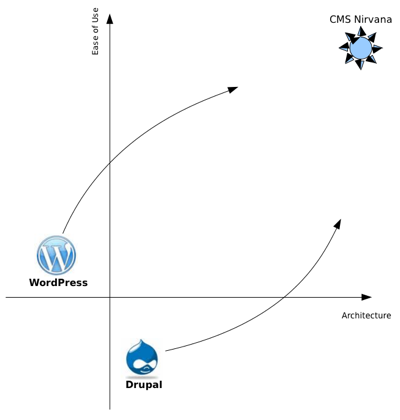
But I think these changes are a pretty natural evolution for both systems. If you could imagine “The Perfect CMS”, what would it be like? It would be easy to use, and it would be full of powerful features, right? It would be lovely to look at, and it would have a strong underlying architecture and API.
I think WordPress and Drupal are both heading in that direction — they just had different starting points. WordPress started with good usability, but a limited architecture and feature set. Drupal started with a strong architecture, but a very developer-centric user experience. But WordPress has been steadily improving its architecture. And Drupal has been working on its UI. They had different origins, and they have taken different paths, but they are both evolving towards CMS Nirvana. And we users get to ride along.
If you could bring a feature from one system to the other, what would it be?
Posted in WordPress
Tagged cms, Community, comparison, content management, convergence, drupal, drupalcamp, features, nirvana, ui, usability, user experience, ux, wordcamp, WordPress
38 Comments
Pitfalls of a Popular Project
My presentation for WordCamp Birmingham 2010 was on the Pitfalls of a Popular Project. This is a non-technical talk, and it is not specific to WordPress (though I use WordPress as an example in a couple of places).
You can download the PowerPoint version of my presentation, which should include my notes for more information.
Posted in WordPress
Tagged birmingham, Community, hackers, presentations, Spam, trolls, wcbhm, wcbhm10, wordcamp, WordPress
3 Comments
WordPress Care Package
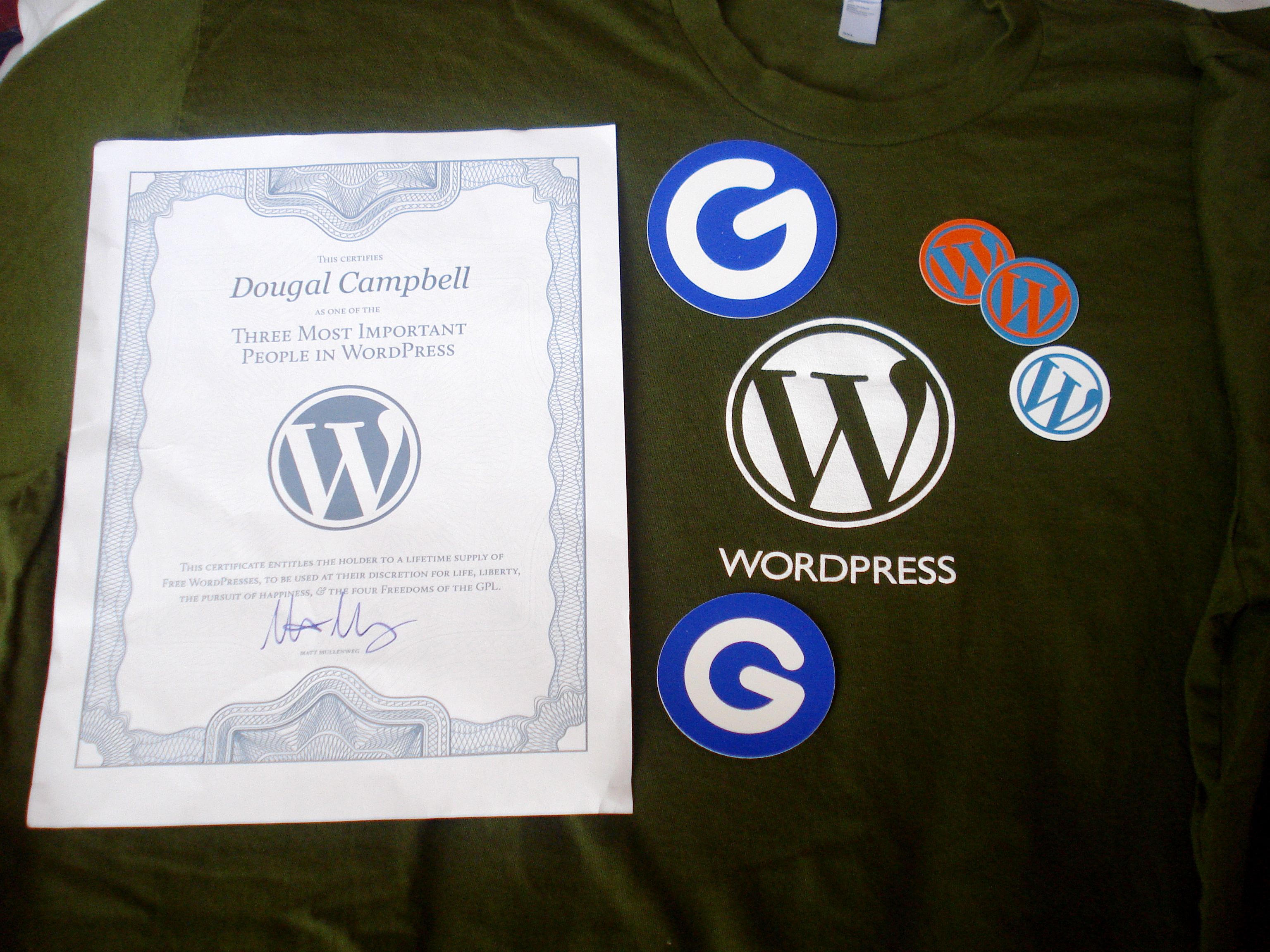
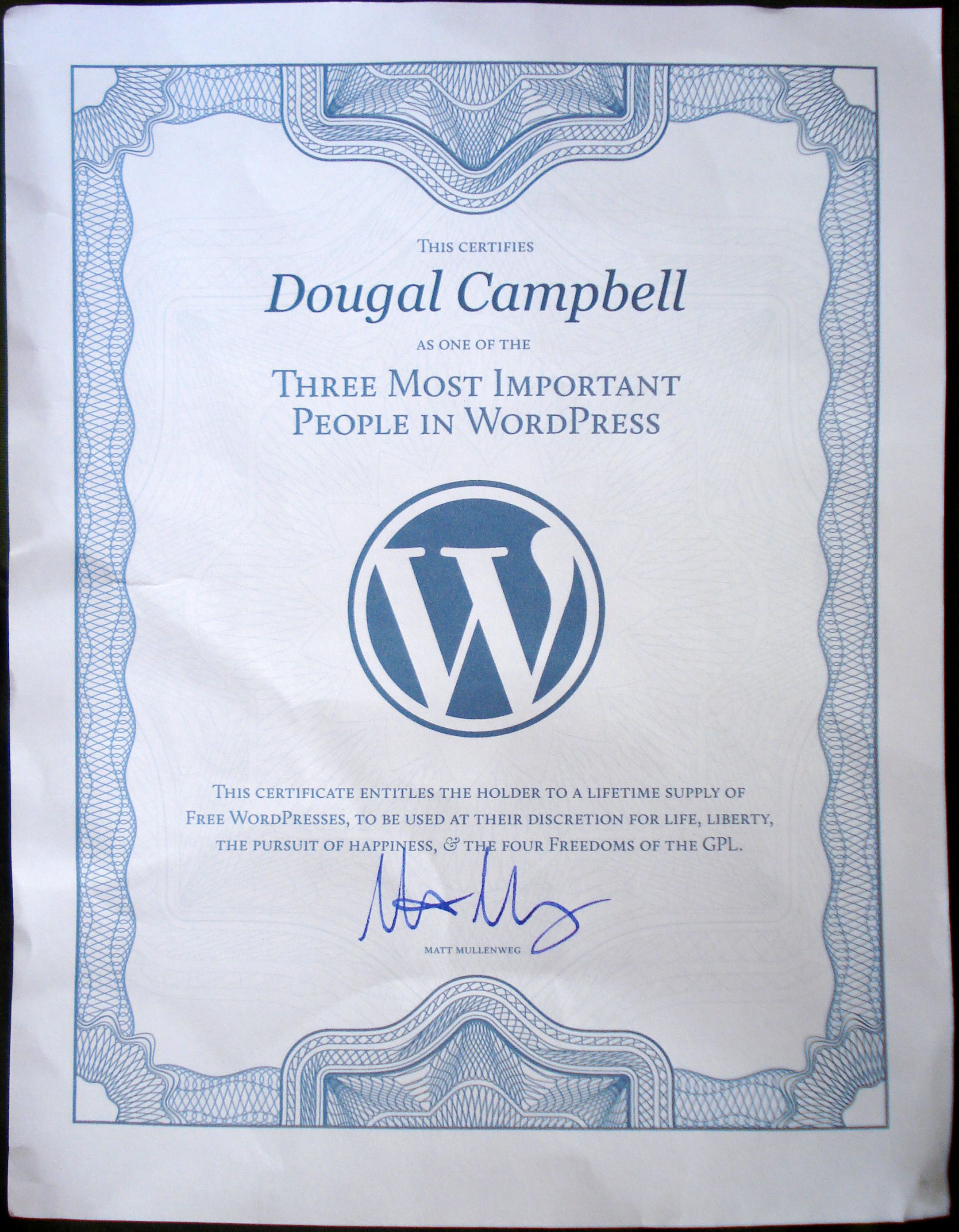
Around the time of the Thesis GPL debates, WordPress founder Matt Mullenweg made an offer to send people free t-shirts. When I talked to him at WordCamp Savannah, he said that he had gotten about 300 requests. I got my care package right after I returned from the WordCamp. In addition to the shirt, it included some Gravatar and WordPress stickers, and a nice certificate, proclaiming that I am “One of the Three Most Important People in WordPress”. Of course, so are the other 300 people who got a certificate in their care packages. Awesomesauce. 🙂
Posted in WordPress
Tagged certificate, gpl, photomatt, shirt, stickers, thesis, WordPress
7 Comments